Build a Working AI Agent on Your Mac (No Cloud, No API Keys)
Part One of two. Part Two covers the Karpathy wiki pattern and the feedback loop.

1. Why this guide exists
The prior article in this series, “RAG vs Agentic Search on Apple Silicon,” ran 42 structured tests across three retrieval approaches (classical RAG, cloud-assisted agentic search, and fully local agentic search) on three models. The headline finding was that agentic search performance depends on the model driving the search, not just the architecture. That article answered the question of whether local agentic search is viable. This one answers a different question, which is how to actually run it on a Mac you already own. The guide starts from a clean Mac and covers every step, including prerequisites. No prior experience with Python, MLX, or local AI is required.
The guide is deliberately tool-agnostic in spirit and concrete in execution. The substrate is MLX, because that is the path of least resistance on Apple Silicon today. The worked examples use a plain Python script with a hand-rolled agent loop (an agent, in this context, is a program that can decide on its own to search for information, evaluate what it finds, and search again if the first result was not sufficient), because that makes every moving part visible and modifiable. Readers on OpenClaw, LangChain, or any other agent framework should be able to map every step in this guide to their tool of choice without losing the substance.
A note on format. The sections that follow alternate between two modes. Setup sections (2 through 5, and 10) are procedural, with numbered steps, exact commands, and expected output. Diagnostic sections (6 through 9) are written as prose, because the skill they teach is judgment rather than execution. The mode shift is deliberate, and Section 5 ends with a short marker to signal it.
2. What you need before starting
Before you begin
This section covers prerequisites that the rest of the guide depends on. If you have been following the earlier articles in this series, you likely have all of these already. If this is your first time working in the terminal on a Mac, read each item carefully.
Homebrew. Homebrew is the standard package manager for macOS. The guide uses it to install tools. Open Terminal (you can find it in Applications > Utilities, or search for “Terminal” in Spotlight) and run:
brew --version
If you see a version number, Homebrew is installed. If the command is not found, install it with:
/bin/bash -c "$(curl -fsSL https://raw.githubusercontent.com/Homebrew/install/HEAD/install.sh)"
Follow the on-screen instructions. When it finishes, close and reopen Terminal, then run brew --version again to confirm.
Git. The guide uses git to download documentation. Run:
git --version
If you see a version number, git is installed. If macOS shows a popup asking to install the Xcode Command Line Tools, click “Install” and wait for it to finish. This is normal on a Mac that has never used developer tools. Once the install completes, run git --version again to confirm.
Python. You do not need to install Python separately. The uv tool (installed in Step 2.2) manages Python versions for you. When you create a virtual environment in Step 4.1, uv will download and use the right Python version automatically.
Create a project directory. Everything in this guide (the virtual environment, the scripts, the vector database) lives in one project directory. Create it now and work from it for the rest of the guide.
mkdir -p ~/agentic-search
cd ~/agentic-search
Every terminal command from this point forward assumes you are in ~/agentic-search/. If you open a new terminal window or tab at any point, run cd ~/agentic-search first.
Step 2.1, Check your hardware
Apple Silicon with enough unified memory to load a 26B-parameter mixture-of-experts model at 4-bit quantization and still leave headroom for KV cache, the embedding model, and the operating system. The KV cache (short for key-value cache) is the memory the model uses to hold context from earlier in the conversation; it grows with each search iteration as the conversation history gets longer. The model itself (Gemma 4 26B A4B) is roughly 16 GB at 4-bit, but agentic runs grow the KV cache with each search iteration, and long runs can push total memory draw well above the weight footprint alone.
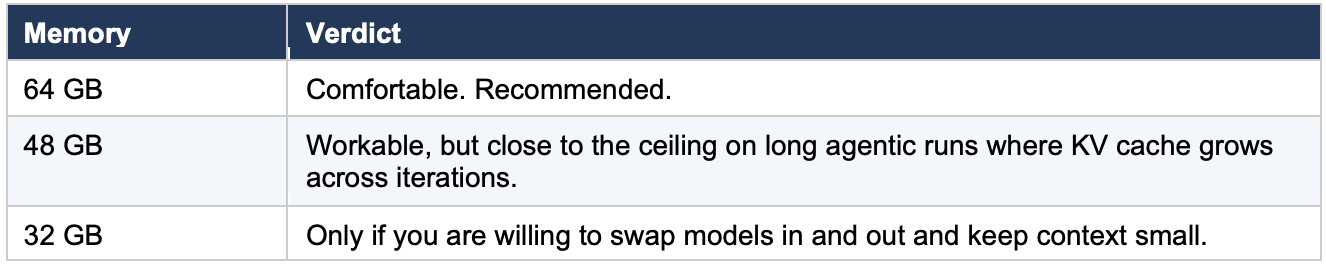
The walkthrough below was developed on a Mac Mini M4 Pro with 64 GB and re-run on a MacBook Pro M5 Pro with 64 GB. Either machine handles the workload without thermal throttling on bursty agentic workloads.
Step 2.2, Install uv
Use uv for environment and package management. It is fast, reproducible, and avoids the long tail of pip and venv friction that gets in the way of quick iteration.
brew install uv
Verify the install.
uv --version
Expected output is a version string. If you already have uv installed, make sure it is current.
brew upgrade uv
Step 2.3, A note on orchestration
The prior article’s testing ran on OpenClaw. This guide uses a plain Python script instead, because it makes every piece of the agent loop visible and modifiable. Readers on OpenClaw or another agent framework can translate each step to their tool of choice; the patterns are the same regardless of orchestration layer.
The guide provides two scripts. prepare_corpus.py runs once to chunk, embed, and store the documentation in a local vector database. agent.py is the agent loop itself. Both are shown in full in Section 5.
Step 2.4, Note the pieces you will add in later sections
You will install mlx-lm in Section 4. The remaining dependencies (ChromaDB, the embedding model, and the OpenAI client library) are installed at the start of Section 5. Do not install them early; the Section 5 instructions are specific about what goes where.
3. The corpus and the questions
Step 3.1, Download the corpus
The corpus is the same four documentation sets used in the prior article. Each is a public GitHub repository. The commands below pull only the documentation files (not the source code) to keep the corpus focused and the download small.
Create the directory structure first.
mkdir -p ~/test-corpus/mlx ~/test-corpus/openclaw ~/test-corpus/transformers ~/test-corpus/sentence-transformers
MLX documentation.
cd ~/test-corpus
git clone --depth 1 https://github.com/ml-explore/mlx.git mlx-repo
cp -r mlx-repo/docs/* mlx/
cp mlx-repo/README.md mlx/
rm -rf mlx-repo
find mlx/ -type f | wc -l
OpenClaw documentation.
cd ~/test-corpus
git clone --depth 1 https://github.com/openclaw/openclaw.git openclaw-repo
cp -r openclaw-repo/docs/* openclaw/
cp openclaw-repo/README.md openclaw/
rm -rf openclaw-repo
find openclaw/ -type f | wc -l
HuggingFace Transformers documentation. This repository is large. The sparse checkout pulls only the English documentation directory.
cd ~/test-corpus
git clone --no-checkout --depth 1 https://github.com/huggingface/transformers.git transformers-repo
cd transformers-repo
git sparse-checkout init --cone
git sparse-checkout set docs/source/en
git checkout
mv docs/source/en/* ../transformers/
cd ..
rm -rf transformers-repo
find transformers/ -type f | wc -l
Sentence-Transformers documentation.
cd ~/test-corpus
git clone --no-checkout --depth 1 https://github.com/UKPLab/sentence-transformers.git st-repo
cd st-repo
git sparse-checkout init --cone
git sparse-checkout set docs
git checkout
mv docs/* ../sentence-transformers/
cd ..
rm -rf st-repo
find sentence-transformers/ -type f | wc -l
Verify the full corpus.
echo "=== MLX ===" && find ~/test-corpus/mlx/ -type f | wc -l
echo "=== OpenClaw ===" && find ~/test-corpus/openclaw/ -type f | wc -l
echo "=== Transformers ===" && find ~/test-corpus/transformers/ -type f | wc -l
echo "=== Sentence-Transformers ===" && find ~/test-corpus/sentence-transformers/ -type f | wc -l
echo "=== Total ===" && find ~/test-corpus/ -type f | wc -l
The exact file counts will depend on the state of each repository at the time you clone. The important thing is that all four directories contain files and the total is in the hundreds. If any directory is empty, the clone or copy step for that repo failed; re-run that block.
Each set was chunked at roughly 512 tokens with the Qwen3 embedding model in the prior article. The prepare_corpus.py script in Section 5 handles the chunking and embedding for this guide. The total corpus is small enough to fit comfortably in a single ChromaDB collection on a laptop, and large enough that no single query is going to find its answer in the top result by accident. That is the sweet spot for studying agentic search behavior, because it forces the model to actually reason about whether a first search was sufficient.
Step 3.2, Understand the six questions
The six questions are identical to the ones used in the prior article. They are reproduced here so readers can follow the worked traces and summary table without switching tabs.
Question 1, Exact Match. “What Python command installs the MLX framework via pip?” This is a direct lookup. The answer is a single line in the MLX documentation, and a well-calibrated agent should find it in one search iteration.
Question 2, Needle in a Haystack. “What is the maximum sequence length supported by the Sentence-Transformers all-MiniLM-L6-v2 model?” The answer (256 tokens) exists in the model’s configuration metadata, but whether it appears in the documentation files captured during the corpus clone depends on whether the relevant model card or config page was included in the docs/ directory at the time of download. The challenge is that the corpus contains many sequence-length references across multiple doc sets, and the agent has to either find the right one for the right model or correctly conclude that the specific number is not in the available documentation. This question tests behavior at the edge of what the corpus contains.
Question 3, Conceptual/Vocabulary Gap. “Which documents discuss approaches to reducing the memory footprint of large language models during inference?” The answer spans multiple doc sets. The difficulty is that each doc set uses different vocabulary for the same concept (quantization, pruning, compression, distillation). The agent has to search using multiple terms or recognize the conceptual overlap across results.
Question 4, Cross-Reference. “How does the quantization approach used in MLX compare to the quantization methods described in the HuggingFace Transformers documentation?” This requires the agent to find relevant material in two doc sets and synthesize a comparison. A single search will not suffice; the agent has to search MLX documentation, search HuggingFace documentation, and connect the two.
Question 5, Multi-Document Synthesis. “Create a step-by-step guide for setting up a local development environment that uses OpenClaw as the agent, MLX for model inference, and a HuggingFace model.” The answer requires pulling specific setup information from three of the four doc sets and assembling it into a coherent sequence. This is the question that most directly tests whether the agent can build a composite answer across multiple search iterations.
Question 6, Negative Test. “What are the recommended settings for fine-tuning a Sentence-Transformers model using MLX on Apple Silicon?” The answer does not exist in the corpus. No document covers this topic. The correct response is for the agent to report that the corpus does not contain this information. This question is treated separately in Section 8 and is not part of the five-question cross-reference set.
Step 3.3, Note the split
Questions 1 through 5 form the cross-reference set. Their results appear in the summary table in Section 10, and Part Two will rerun them against the compiled wiki. Question 6, the negative test, is discussed in Section 8 alongside the borderline behavior observed on Question 2.
4. Pull and verify Gemma 4 26B MoE
The model used throughout the walkthrough is mlx-community/gemma-4-26b-a4b-it-4bit.
Gemma 4 26B A4B is a mixture-of-experts model with 26 billion total parameters, but only approximately 4 billion parameters activate per token (hence “A4B” in the model name). That efficiency ratio is what makes it viable on Apple Silicon. It runs with the latency profile of a much smaller model while drawing on the knowledge capacity of a much larger one. Gemma 4 is the default for this guide for two reasons. First, it produced the most interesting results in the prior study, with breakthrough answers on two of the questions that the other models could not match. Second, it exhibited the widest range of agentic behavior, from clean single-iteration lookups to borderline multi-iteration runs, which makes it the right model for teaching both what working looks like and what to watch out for.
Step 4.1, Create a fresh environment
Make sure you are in the project directory (cd ~/agentic-search), then create a virtual environment.
uv venv .venv
source .venv/bin/activate
The uv venv command produces no visible output on success. If it returns to the prompt without an error message, it worked. The source command activates the environment. You should see (.venv) appear at the beginning of your terminal prompt, which confirms the environment is active.
Step 4.2, Install mlx-lm at the pinned version
Gemma 4 tool-call support in mlx-lm has been a moving target. Tool calling is how the model invokes the search function during an agentic run; Section 5 covers the mechanics in detail. What matters at this step is that the version of mlx-lm you install includes a working tool parser for Gemma 4. The initial parser shipped in 0.31.2, but that version had known issues with function name parsing and argument handling that caused tool calls to fail in practice. Version 0.31.3 includes fixes specifically for the Gemma 4 tool parser. Since this entire guide depends on tool use, 0.31.3 is the minimum version.
uv pip install mlx-lm==0.31.3
Step 4.3, Verify the version
An older mlx-lm in your path will silently take precedence and waste an hour of your time.
python -c "import mlx_lm; print(mlx_lm.__version__)"
Expected output.
0.31.3
If it is anything else, your environment is not active or a system Python is shadowing it. Re-activate with source .venv/bin/activate and try again.
Step 4.4, Load the model and run a sanity check
The first time you reference the model, mlx-lm will download it from the Hugging Face hub. The 4-bit quantization brings the on-disk size to roughly 15.6 GB. This download happens once; subsequent runs use the cached copy.
Create a short test script. Open a text editor and save the following as test_model.py in your project directory (~/agentic-search/). If you are not sure how to create a Python file, you can use the nano editor in the terminal by running nano test_model.py, pasting the code, then pressing Ctrl+O to save and Ctrl+X to exit. VS Code also works well. If you use TextEdit, switch it to plain text mode first (Format > Make Plain Text), otherwise it will save the file in Rich Text Format, which Python cannot read.
from mlx_lm import load, generate

print("Loading model (this may take a few minutes on first run)...")
model, tokenizer = load("mlx-community/gemma-4-26b-a4b-it-4bit")
print("Model loaded. Generating test response...")
response = generate(model, tokenizer, prompt="Say hello in one word.", max_tokens=8)
print(f"Response: {response}")
print("Done. The model is working.")
Run it.
python test_model.py
Expected behavior. A download progress bar on first run (this can take several minutes depending on your internet speed), then “Model loaded,” then a single-word greeting, then “Done.” If you see all of that, the model is working.
Troubleshooting
Errors on the load step. Almost always an mlx-lm version mismatch. Re-run Step 4.3.
Loads but produces garbage tokens. Same cause. Re-run Step 4.3.
Out of memory. Check that no other large model is resident. Gemma 4 26B at 4-bit needs roughly 16 GB of unified memory for the weights alone, plus additional memory for KV cache that grows with context length. On an agentic run with multiple search iterations, total memory draw can reach well above the weight footprint.
A note on the model’s lineage (no action needed)
The following is background information. You do not need to do anything differently because of it.
The mlx-community/gemma-4-26b-a4b-it-4bit model was converted to MLX format using mlx-vlm, which is the multimodal branch of the MLX ecosystem. Gemma 4 is natively a multimodal model (text, image, video). For the purposes of this guide, we use it in text-only mode through mlx-lm, which loads the language stack and ignores the vision components. This is the standard path for text-only inference on Apple Silicon and is well-supported in mlx-lm 0.31.3.
A note on Gemma 4 tool-call format (no action needed)
This is also background information. The mlx-lm server handles this for you automatically.
Gemma 4 uses a non-standard tool-call format with <|tool_call> / <tool_call|> delimiters and <|"|> string escaping, which differs from the formats used by Llama, Mistral, and other model families. The mlx-lm tool parser for Gemma 4 was added recently and has been patched across multiple releases. If you encounter tool-call parsing errors after confirming you are on 0.31.3, check the mlx-lm GitHub issues for the latest status; this is an area of active development.
5. Build the agent
This section provides two complete Python scripts. The first prepares the corpus (run it once). The second is the agent loop itself (run it for every question). Both are shown in full, then the key decisions in each script are explained so readers understand what to change and what to leave alone.
Step 5.1, Install the remaining dependencies
With your virtual environment active (the one from Step 4.1), install the three packages the scripts need.
uv pip install chromadb sentence-transformers openai
chromadb is the vector store. sentence-transformers loads the Qwen3 embedding model for corpus preparation. openai is the Python client library for the OpenAI-compatible API that the mlx-lm server exposes. The agent script talks to the local model through this client, not through the cloud.
A note on install time. The sentence-transformers package pulls in PyTorch as a dependency, which is a large download (several gigabytes). If this is your first time installing it, the install step may take five to ten minutes. This is normal. Let it finish.
Step 5.2, Prepare the corpus
The four documentation sets should be on disk at ~/test-corpus/ from Step 3.1, with subdirectories for each project (mlx, openclaw, transformers, sentence-transformers). Verify they are there before running the script.
Save the following script as prepare_corpus.py in your project directory (~/agentic-search/). You can create the file using any text editor (VS Code, nano prepare_corpus.py in the terminal, or TextEdit in plain text mode). If you use TextEdit, switch to plain text first (Format > Make Plain Text) or the file will not work. The important thing is that the file is saved with the .py extension and is in the same directory where you created the virtual environment.
#!/usr/bin/env python3
"""
prepare_corpus.py

One-time setup. Reads the four documentation sets, chunks them,
embeds with Qwen3-Embedding-0.6B, and stores in a local ChromaDB collection.
"""

import os
import chromadb
from sentence_transformers import SentenceTransformer

CORPUS_PATH = os.path.expanduser("~/test-corpus")
CHROMA_PATH = "./chroma_db"
COLLECTION_NAME = "test-corpus"
CHUNK_SIZE = 2048       # characters, roughly 512 tokens
CHUNK_OVERLAP = 200     # characters, roughly 50 tokens
EMBEDDING_MODEL = "Qwen/Qwen3-Embedding-0.6B"

SOURCE_DIRS = {
    "mlx": "mlx",
    "openclaw": "openclaw",
    "transformers": "transformers",
    "sentence-transformers": "sentence-transformers",
}

FILE_EXTENSIONS = {".md", ".rst", ".txt", ".html"}


def read_files(corpus_path):
    documents = []
    for dir_name, source_label in SOURCE_DIRS.items():
        dir_path = os.path.join(corpus_path, dir_name)
        if not os.path.isdir(dir_path):
            print(f"  Warning: directory not found: {dir_path}")
            continue
        file_count = 0
        for root, _, files in os.walk(dir_path):
            for fname in files:
                ext = os.path.splitext(fname)[1].lower()
                if ext not in FILE_EXTENSIONS:
                    continue
                fpath = os.path.join(root, fname)
                try:
                    with open(fpath, "r", encoding="utf-8", errors="ignore") as f:
                        text = f.read()
                    if text.strip():
                        documents.append({
                            "source": source_label,
                            "file": os.path.relpath(fpath, corpus_path),
                            "text": text,
                        })
                        file_count += 1
                except Exception as e:
                    print(f"  Skipping {fpath}: {e}")
        print(f"  {source_label}: {file_count} files")
    return documents


def chunk_text(text, chunk_size, overlap):
    paragraphs = text.split("\n\n")
    chunks = []
    current_chunk = ""
    for para in paragraphs:
        para = para.strip()
        if not para:
            continue
        if len(current_chunk) + len(para) + 2 > chunk_size and current_chunk:
            chunks.append(current_chunk.strip())
            current_chunk = current_chunk[-overlap:] + "\n\n" + para
        else:
            current_chunk = (current_chunk + "\n\n" + para
                             if current_chunk else para)
    if current_chunk.strip():
        chunks.append(current_chunk.strip())
    return chunks


def main():
    print("Reading files...")
    documents = read_files(CORPUS_PATH)
    print(f"  Total files: {len(documents)}\n")

    print("Chunking...")
    all_chunks = []
    for doc in documents:
        chunks = chunk_text(doc["text"], CHUNK_SIZE, CHUNK_OVERLAP)
        for i, chunk in enumerate(chunks):
            all_chunks.append({
                "id": f"{doc['source']}-{doc['file']}-{i:04d}",
                "source": doc["source"],
                "file": doc["file"],
                "text": chunk,
            })
    print(f"  Total chunks: {len(all_chunks)}\n")

    print(f"Loading embedding model ({EMBEDDING_MODEL})...")
    embedder = SentenceTransformer(EMBEDDING_MODEL)
    embedder.max_seq_length = 512

    print("Embedding chunks...")
    texts = [c["text"] for c in all_chunks]
    embeddings = embedder.encode(texts, show_progress_bar=True, batch_size=8)
    print(f"  Embedded {len(embeddings)} chunks.\n")

    print(f"Storing in ChromaDB at {CHROMA_PATH}...")
    client = chromadb.PersistentClient(path=CHROMA_PATH)
    try:
        client.delete_collection(COLLECTION_NAME)
    except Exception:
        pass

    collection = client.create_collection(
        name=COLLECTION_NAME,
        metadata={"hnsw:space": "cosine"},
    )

    batch_size = 500
    for start in range(0, len(all_chunks), batch_size):
        end = min(start + batch_size, len(all_chunks))
        batch = all_chunks[start:end]
        collection.add(
            ids=[c["id"] for c in batch],
            documents=[c["text"] for c in batch],
            embeddings=[embeddings[start + i].tolist()
                        for i in range(len(batch))],
            metadatas=[{"source": c["source"], "file": c["file"]}
                       for c in batch],
        )

    print(f"  Collection '{COLLECTION_NAME}': {collection.count()} chunks.")
    print("Done.")


if __name__ == "__main__":
    main()
Run it once.
python prepare_corpus.py
Expected output is a step-by-step log ending with a chunk count and “Done.” The embedding step takes a few minutes on first run while the Qwen3 model downloads. Subsequent runs are faster. Once the script finishes, a chroma_db/ directory exists in your working directory and contains the full searchable corpus.
Step 5.3, Start the model server
Open a second terminal window (Cmd+N in Terminal, or Cmd+T for a new tab). Navigate to the project directory and activate the virtual environment in this new terminal.
cd ~/agentic-search
source .venv/bin/activate
Then start the mlx-lm server.
python -m mlx_lm.server \
    --model mlx-community/gemma-4-26b-a4b-it-4bit \
    --port 8080
The server loads the model into memory and exposes an OpenAI-compatible chat completions endpoint at http://localhost:8080/v1. Leave this terminal running. The agent script in the next step connects to it.
Why a server rather than loading the model inside the agent script? Two reasons. First, the model stays resident between runs, so you can test multiple questions without reloading 16 GB of weights each time. Second, the mlx-lm server handles Gemma 4’s tool-call format (the non-standard <|tool_call> delimiters and the argument parser that was fixed in 0.31.3) so the agent script does not have to.
Step 5.4, The agent script
Save the following as agent.py in your project directory (~/agentic-search/).
#!/usr/bin/env python3
"""
agent.py

A minimal agent loop for local agentic search on Apple Silicon.
Connects to a local mlx-lm server, uses a ChromaDB search tool,
and prints a full trace of every iteration.

Usage:
    python agent.py "What Python command installs the MLX framework via pip?"
"""

import json
import sys
import time

import chromadb
from openai import OpenAI
from sentence_transformers import SentenceTransformer

# ----------------------------------------------------------------
# Configuration
# ----------------------------------------------------------------

SERVER_URL = "http://localhost:8080/v1"
MODEL_NAME = "mlx-community/gemma-4-26b-a4b-it-4bit"
CHROMA_PATH = "./chroma_db"
COLLECTION_NAME = "test-corpus"
EMBEDDING_MODEL = "Qwen/Qwen3-Embedding-0.6B"
MAX_ITERATIONS = 6
DIVERSITY_THRESHOLD = 0.8

# ----------------------------------------------------------------
# System prompt
# ----------------------------------------------------------------

SYSTEM_PROMPT = (
    "You are a research assistant with access to a search tool that "
    "searches local documentation for MLX, OpenClaw, HuggingFace "
    "Transformers, and Sentence-Transformers.\n\n"
    "Use the search tool to find information relevant to the user's "
    "question. You may call the tool multiple times with different "
    "queries to gather enough information for a complete answer.\n\n"
    "If the search returns no relevant results after a reasonable "
    "attempt, say so clearly. Reporting that the corpus does not "
    "contain the answer is a valid and preferred outcome when the "
    "information is not available.\n\n"
    "Do not repeat the same search query. If your initial searches "
    "do not find what you need, try a substantially different angle "
    "or conclude that the corpus does not contain the information."
)

# ----------------------------------------------------------------
# Tool definition (OpenAI function-calling format)
# ----------------------------------------------------------------

TOOLS = [
    {
        "type": "function",
        "function": {
            "name": "search_docs",
            "description": (
                "Searches the local documentation corpus for MLX, "
                "OpenClaw, HuggingFace Transformers, and "
                "Sentence-Transformers. The query should be a short "
                "natural-language phrase describing what you want to "
                "find, not a question. Returns up to 8 passages, each "
                "with a document source, a chunk id, and the passage "
                "text. If no relevant passages are found, returns an "
                "empty list."
            ),
            "parameters": {
                "type": "object",
                "properties": {
                    "query": {
                        "type": "string",
                        "description": (
                            "Short natural-language search phrase"
                        ),
                    }
                },
                "required": ["query"],
            },
        },
    }
]


# ----------------------------------------------------------------
# Search function
# ----------------------------------------------------------------

_embedder = None
_collection = None


def _get_embedder():
    global _embedder
    if _embedder is None:
        _embedder = SentenceTransformer(EMBEDDING_MODEL)
        _embedder.max_seq_length = 512
    return _embedder


def _get_collection():
    global _collection
    if _collection is None:
        client = chromadb.PersistentClient(path=CHROMA_PATH)
        _collection = client.get_collection(COLLECTION_NAME)
    return _collection


def search_docs(query):
    embedder = _get_embedder()
    query_embedding = embedder.encode([query])[0].tolist()
    collection = _get_collection()
    results = collection.query(
        query_embeddings=[query_embedding], n_results=8
    )

    passages = []
    for i, doc in enumerate(results["documents"][0]):
        passages.append({
            "source": results["metadatas"][0][i].get("source", "unknown"),
            "chunk_id": results["ids"][0][i],
            "text": doc,
        })
    return passages


# ----------------------------------------------------------------
# Query diversity check
# ----------------------------------------------------------------

def token_overlap(q1, q2):
    tokens1 = set(q1.lower().split())
    tokens2 = set(q2.lower().split())
    if not tokens1 or not tokens2:
        return 0.0
    intersection = tokens1 & tokens2
    return len(intersection) / max(len(tokens1), len(tokens2))


def queries_are_repetitive(recent_queries):
    if len(recent_queries) < 3:
        return False
    last = recent_queries[-1]
    prev_two = recent_queries[-3:-1]
    return all(
        token_overlap(last, q) > DIVERSITY_THRESHOLD for q in prev_two
    )


# ----------------------------------------------------------------
# Agent loop
# ----------------------------------------------------------------

def run_agent(question):
    client = OpenAI(base_url=SERVER_URL, api_key="not-needed")

    messages = [
        {"role": "system", "content": SYSTEM_PROMPT},
        {"role": "user", "content": question},
    ]

    trace = {
        "question": question,
        "iterations": 0,
        "queries": [],
        "total_tokens": 0,
        "stop_condition": None,
        "answer": None,
        "start_time": time.time(),
    }

    for iteration in range(MAX_ITERATIONS):
        trace["iterations"] = iteration + 1
        print(f"\n--- Iteration {iteration + 1} ---")

        response = client.chat.completions.create(
            model=MODEL_NAME,
            messages=messages,
            tools=TOOLS,
            max_tokens=2048,
        )

        choice = response.choices[0]
        if response.usage:
            trace["total_tokens"] += response.usage.total_tokens

        # No tool call means the model is done
        if choice.finish_reason == "stop" or not choice.message.tool_calls:
            trace["stop_condition"] = "confident_answer"
            trace["answer"] = choice.message.content
            print("  Model produced final answer.")
            break

        # Parse the tool call
        tool_call = choice.message.tool_calls[0]
        try:
            args = json.loads(tool_call.function.arguments)
        except json.JSONDecodeError:
            print(f"  Parse error: {tool_call.function.arguments}")
            trace["stop_condition"] = "parse_error"
            trace["answer"] = "Terminated: tool call parse error."
            break

        query = args.get("query", "")
        trace["queries"].append(query)
        print(f'  search_docs("{query}")')

        # Diversity check
        if queries_are_repetitive(trace["queries"]):
            print("  Diversity check triggered.")
            messages.append(choice.message)
            messages.append({
                "role": "tool",
                "tool_call_id": tool_call.id,
                "content": json.dumps([]),
            })
            messages.append({
                "role": "user",
                "content": (
                    "Your recent queries have been very similar. "
                    "Either try a substantially different angle or "
                    "conclude the corpus does not contain this "
                    "information."
                ),
            })
            continue

        # Execute the search
        results = search_docs(query)
        print(f"  {len(results)} passages returned.")
        for r in results:
            print(f"    [{r['source']}] {r['chunk_id']}")

        # Add to conversation history
        messages.append(choice.message)
        messages.append({
            "role": "tool",
            "tool_call_id": tool_call.id,
            "content": json.dumps(results),
        })

    else:
        trace["stop_condition"] = "iteration_cap"
        trace["answer"] = (
            "Terminated: reached iteration cap without final answer."
        )
        print(f"\n  Iteration cap ({MAX_ITERATIONS}) reached.")

    trace["elapsed_seconds"] = round(
        time.time() - trace["start_time"], 1
    )
    return trace


# ----------------------------------------------------------------
# Trace output
# ----------------------------------------------------------------

def print_trace(trace):
    print("\n" + "=" * 64)
    print("TRACE SUMMARY")
    print("=" * 64)
    print(f"  Question:       {trace['question']}")
    print(f"  Iterations:     {trace['iterations']}")
    print(f"  Total tokens:   {trace['total_tokens']}")
    print(f"  Elapsed:        {trace.get('elapsed_seconds', '?')}s")
    print(f"  Stop condition: {trace['stop_condition']}")
    print()
    print("  Queries issued:")
    for i, q in enumerate(trace["queries"], 1):
        print(f'    {i}. "{q}"')
    print()
    print("  Final answer:")
    print(f"  {trace['answer']}")
    print("=" * 64)


if __name__ == "__main__":
    if len(sys.argv) < 2:
        print('Usage: python agent.py "your question here"')
        sys.exit(1)

    question = sys.argv[1]
    trace = run_agent(question)
    print_trace(trace)
Step 5.5, How the script works
The script is short enough to read end to end, but five design decisions in it are doing real work and are worth understanding before you run anything.
The tool contract. The TOOLS list defines a single function, search_docs, in the OpenAI function-calling schema. The mlx-lm server translates this into Gemma 4’s native tool format automatically. Three details in the description matter more than they appear to.
The phrase “short natural-language phrase describing what you want to find, not a question” cuts the rate at which the model passes raw user questions into the tool, which produces noisier retrievals. The explicit list of the four corpora tells the model what is in scope, which reduces the rate at which it searches for things the corpus cannot answer. The mention of “up to 8 passages” and the “returns an empty list” fallback gives the model a clear shape to reason about, which reduces the rate at which it loops on empty results. That last clause (the empty-list fallback) is the single most effective anti-paralysis measure in the entire script.
The system prompt. Two sentences in SYSTEM_PROMPT are load-bearing. “Reporting that the corpus does not contain the answer is a valid and preferred outcome” gives the model explicit permission to stop searching and conclude. Without it, the model treats every empty result as evidence that it searched wrong rather than evidence that the corpus is silent. “Do not repeat the same search query” nudges the model toward the diversity check’s intent without waiting for the check to trigger.
The agent loop. The for iteration in range(MAX_ITERATIONS) loop is the core of the script. On each iteration it sends the full conversation history (system prompt, user question, all prior tool calls and results) to the model and reads back either a final answer or a new tool call. The loop ends in one of three ways. The model produces a final answer (healthy). The model hits the iteration cap (borderline or stuck). The model’s tool call cannot be parsed (error). The else clause on the for loop catches the iteration-cap case.
The diversity check. queries_are_repetitive looks at the last three queries and measures token overlap. If all three are more than 80% similar, the loop injects a nudge message asking the model to change approach or conclude. This is a soft intervention, not a hard stop. The model can ignore it (and sometimes does, which is a signal worth noting in the trace). The threshold of 0.8 and the window of 3 are tunable; these values worked well in the prior testing.
The return shape. search_docs returns a list of dicts with source, chunk_id, and text. Returning structured data rather than a concatenated blob is what lets the model deduplicate across iterations, cite its sources, and decide whether a second search would help. The value of this becomes visible in the traces in Sections 6 and 7, where you can see the model reasoning about which sources it has already seen.
Step 5.6, Run a sanity check
With the server running in one terminal, switch back to your first terminal (the one in ~/agentic-search/ with the virtual environment active) and run Question 1 (the exact-match question).
python agent.py "What Python command installs the MLX framework via pip?"
Expected behavior. One or two iterations, a short trace showing the search queries and results, a correct final answer, and a “confident_answer” stop condition. If the answer is correct and the trace prints cleanly, the agent is working.
This sanity check is a test of the pipeline, not the official run. When you reach Section 10, you will run all six questions and save the output to log files for use in Part Two.
Troubleshooting
Connection refused. The server is not running or is on a different port. Check the other terminal.
Tool call parse errors. Gemma 4’s tool-call format is non-standard, and the parser in mlx-lm 0.31.3 handles most cases but not all. If you see repeated parse errors, check the mlx-lm GitHub issues for patches beyond 0.31.3.
Empty results on every search. The ChromaDB collection is empty or the
CHROMA_PATHinagent.pydoes not match the path used byprepare_corpus.py. Re-runprepare_corpus.pyand verify the chunk count.Model produces a final answer without searching. The system prompt is not reaching the model, or the tool definition is malformed. Print the
messageslist before the API call to inspect what the model is seeing.
You are done with setup when...
The sanity check in Step 5.6 produces a correct answer with a clean trace. At that point, the entire pipeline is working (model server, vector store, search tool, agent loop, trace output) and the rest of this guide is about learning to read what the agent is doing and to tell the difference between a healthy run and a sick one.
A note on what changes from here
Sections 2 through 5 were a procedure. You installed tools, prepared a corpus, started a server, and ran a sanity check. The reader’s success criterion was binary; either the pipeline worked or it did not. The sections that follow are not a procedure. They are about learning to look at what the agent is doing and form a judgment about whether it is working. That is a different kind of skill and it takes a different kind of attention. The format shifts from numbered steps to prose because the content requires it. Section 10 returns to the procedural format for the baseline run.
6. Run a question end to end (full worked trace)
Question 5 is the multi-document synthesis question: “Create a step-by-step guide for setting up a local development environment that uses OpenClaw as the agent, MLX for model inference, and a HuggingFace model.” The answer requires pulling specific setup information from three of the four doc sets and assembling it into a coherent sequence. This is the question that most directly tests whether the agent can build a composite answer across multiple search iterations.
Run it.
python agent.py "Create a step-by-step guide for setting up a local development environment that uses OpenClaw as the agent, MLX for model inference, and a HuggingFace model."
Here is the full trace from the M5 Pro run. The output below shows the agent’s full decision-making process: each search it ran, what it found, and how it arrived at a final answer.
--- Iteration 1 ---
  search_docs("OpenClaw setup guide")
  8 passages returned.
    [openclaw] openclaw-openclaw/start/quickstart.md-0000
    [openclaw] openclaw-openclaw/README.md-0007
    [openclaw] openclaw-openclaw/README.md-0001
    [openclaw] openclaw-openclaw/README.md-0006
    [openclaw] openclaw-openclaw/help/faq-first-run.md-0000
    [openclaw] openclaw-openclaw/README.md-0000
    [openclaw] openclaw-openclaw/start/getting-started.md-0000
    [openclaw] openclaw-openclaw/start/wizard.md-0000

--- Iteration 2 ---
  search_docs("MLX HuggingFace integration")
  8 passages returned.
    [transformers] transformers-transformers/model_doc/blt.md-0000
    [transformers] transformers-transformers/community_integrations/mlx.md-0000
    [transformers] transformers-transformers/community_integrations/mlx.md-0001
    [openclaw] openclaw-openclaw/plugins/reference/huggingface.md-0000
    [transformers] transformers-transformers/model_doc/mistral.md-0004
    [openclaw] openclaw-openclaw/providers/huggingface.md-0000
    [transformers] transformers-transformers/model_doc/electra.md-0003
    [transformers] transformers-transformers/model_doc/mixtral.md-0006

--- Iteration 3 ---
  search_docs("OpenClaw custom endpoint base URL")
  8 passages returned.
    [openclaw] openclaw-openclaw/plugins/codex-harness.md-0027
    [openclaw] openclaw-openclaw/providers/qwen.md-0007
    [openclaw] openclaw-openclaw/providers/minimax.md-0002
    [openclaw] openclaw-openclaw/help/faq-first-run.md-0013
    [openclaw] openclaw-openclaw/providers/ollama.md-0000
    [openclaw] openclaw-openclaw/gateway/local-models.md-0004
    [openclaw] openclaw-openclaw/providers/ollama.md-0017
    [openclaw] openclaw-openclaw/gateway/openai-http-api.md-0004

--- Iteration 4 ---
  Model produced final answer.

================================================================
TRACE SUMMARY
================================================================
  Question:       Create a step-by-step guide for setting up a
                  local development environment that uses OpenClaw
                  as the agent, MLX for model inference, and a
                  HuggingFace model.
  Iterations:     4
  Total tokens:   29,541
  Elapsed:        74.3s
  Stop condition: confident_answer
================================================================
Reading this trace
This is what a healthy multi-iteration run looks like. Four things are worth noting.
Iteration count: 4. Three searches plus a final answer. For a synthesis question that requires material from three doc sets, this is the expected range. The model did not try to answer after one search, which would have produced an incomplete answer. It also did not loop beyond what was needed.
Token consumption: 29,541. Higher than the single-search questions (Q1 used 4,447 tokens, Q3 used 4,754), but proportional to the work done. Three search iterations, each carrying the growing conversation history, and a long final answer that synthesizes setup steps across three tools. This is an appropriate cost for the output quality.
Query evolution: converging, not oscillating. Look at the three queries in sequence. “OpenClaw setup guide” targets the first doc set the answer needs. “MLX HuggingFace integration” targets the second. “OpenClaw custom endpoint base URL” goes back to the OpenClaw docs for the specific configuration detail that connects the first two. Each query is informed by what the prior searches returned. The model found the OpenClaw installation docs, then found how MLX connects to HuggingFace models, then realized it needed the endpoint configuration to connect the two, and went looking for it. This is the pattern of a model that is building an answer rather than circling a gap.
Stop condition: confident_answer. The model decided it had enough material and produced a final answer without being forced to stop by the iteration cap. This is the healthy stop condition.
Compare this trace to Q2’s trace in Section 8 (6 iterations, 50,860 tokens, oscillating queries). The difference is visible in the query evolution. Q5’s queries move forward; Q2’s queries circle. Q5’s token cost is proportional to its output; Q2’s token cost is disproportionate. The Section 7 diagnostics catch the difference cleanly.
Now run it yourself
Run the same question using your agent.py.
python agent.py "Create a step-by-step guide for setting up a local development environment that uses OpenClaw as the agent, MLX for model inference, and a HuggingFace model."
Your trace will not be identical to the one shown above. The exact passages returned by ChromaDB depend on your corpus snapshot (the documentation may have changed since this guide was written), your embedding model’s weights, and the order in which chunks were indexed. Gemma 4 is also not deterministic; the same prompt can produce different search queries across runs.
What should be similar is the shape of the trace. Look for three things. First, the iteration count should be in the range of 3 to 5 for a synthesis question. If it is 1, the model may be producing a shallow answer without searching all three doc sets. If it is 6 (the cap), the model may be exhibiting the borderline behavior discussed in Section 8. Second, the query evolution should show forward movement across doc sets rather than oscillation around a single topic. Third, the stop condition should be “confident_answer” rather than “iteration_cap.” If all three of those match, your pipeline is working correctly, even if the specific queries and passages differ from the trace shown here.
7. Read the trace
A trace is not a log file. A log file records what happened. A trace, read carefully, tells you why it happened and whether it will happen again on a similar question. Four things are worth pulling out of every trace.
Iteration count. How many times did the model call the search tool before producing a final answer? One iteration means the first retrieval was sufficient, which is a good outcome for a direct lookup question and a suspicious outcome for a synthesis question. Two or three iterations is the healthy middle for most questions in this corpus. Anything above five on a question that should have been answerable is a signal that something is wrong, either with the tool contract, the corpus, or the model’s calibration.
Token consumption. Total tokens generated by the model across the run, not counting the tool responses themselves. This is the cost number, and it scales nonlinearly with iteration count because each iteration carries the full prior context. A two-iteration run might cost 4,000 tokens; a five-iteration run on the same question can cost 20,000. When tuning the persistence dial in Section 9, this is the number to watch.
Query evolution. Look at the actual query strings the model passed into the tool across iterations. A healthy run shows the queries getting more specific, more targeted, or pivoting to a different angle when the first angle returned nothing useful. An unhealthy run shows the queries either repeating verbatim, drifting into vagueness, or oscillating between two phrasings without converging. Query evolution is the single best diagnostic for whether the model understands what it is doing.
Stop condition. Why did the loop end? Three good reasons exist. The model produced a final answer because it had enough information. The model produced a final answer because it correctly concluded the corpus did not contain the answer. The model hit the iteration cap and was forced to stop. The first two are healthy. The third is a warning sign, and Section 8 shows what the early stages of that failure mode look like.
A trace where iteration count is low, token consumption is proportional, queries evolve sensibly, and the stop condition is a confident answer is a working agent. A trace where any one of those is off is a signal worth investigating before running the next question.
8. What borderline behavior looks like
Not every problematic run is a catastrophic failure. Some runs land in a gray zone: they produce a final answer, they do not hit the iteration cap, but they consume far more resources than they should and show warning signs that a reader needs to learn to recognize. Question 2 from this guide’s test set is that kind of run.
Question 2 asked: “What is the maximum sequence length supported by the Sentence-Transformers all-MiniLM-L6-v2 model?” The answer is a specific number in the Sentence-Transformers documentation. Here is what the agent did.
TRACE SUMMARY
================================================================
  Question:       What is the maximum sequence length supported by
                  the Sentence-Transformers all-MiniLM-L6-v2 model?
  Iterations:     6
  Total tokens:   50,860
  Elapsed:        41.6s
  Stop condition: confident_answer

  Queries issued:
    1. "all-MiniLM-L6-v2 maximum sequence length"
    2. "all-MiniLM-L6-v2"
    3. "sentence-transformers"
    4. "all-MiniLM-L6-v2 max_seq_length"
    5. "MiniLM sequence length"

  Final answer:
  Based on the provided documentation, there is no specific mention
  of the maximum sequence length for the all-MiniLM-L6-v2 model.
================================================================
Read this trace against the four diagnostics from Section 7.
Iteration count: 6. This is the maximum allowed by the iteration cap. The model used every iteration it was given. For a question that should be answerable from a single document, six iterations is high. Compare this to Question 1 (exact match), which resolved in 2 iterations and 4,447 tokens.
Token consumption: 50,860. This is more than 10x the token cost of a healthy two-iteration run on the same model. Each iteration carries the full conversation history from all prior iterations, so the cost curve is not linear. By iteration 5, the model is generating against a context that includes five prior search results (40 passages total), plus all of its own prior reasoning. This is the cost signature of a run that is not converging.
Query evolution: oscillating, not converging. Look at the five queries in sequence. The model starts specific (”all-MiniLM-L6-v2 maximum sequence length”), then drops to just the model name (”all-MiniLM-L6-v2”), then broadens to the entire library (”sentence-transformers”), then narrows back to a variant of the original query (”all-MiniLM-L6-v2 max_seq_length”), then tries yet another variant (”MiniLM sequence length”). This is not the pattern of a model that is refining its search strategy. This is the pattern of a model that is circling the same terrain, hoping a slightly different phrasing will surface a result that does not exist in the top retrieval results.
Stop condition: confident_answer. The model did eventually conclude that the corpus does not contain the answer. This is the correct conclusion, and the fact that it reached it at all is meaningful. A fully paralyzed model would have hit the iteration cap without producing any answer. This run is borderline, not catastrophic.
The Q2 trace is valuable precisely because it is not a clear-cut failure. A reader who sees only healthy traces and catastrophic failures will not learn to recognize the runs that fall in between. In practice, most problematic runs look like Q2: they finish, they produce an answer, but they cost 10x what they should and the query evolution reveals a model that is not reasoning well about its search strategy.
A note on what we expected and what we found
The prior article in this series, which ran on mlx-lm 0.31.2 without the system prompt and tool contract improvements in this guide, documented full search paralysis on the negative test (Question 6). In that study, the same question consumed 20 iterations and approximately 94,000 tokens before being terminated by the iteration cap. The model never produced a final answer.
When we re-ran the same question for this guide with the agent.py script (which includes the system prompt’s permission to conclude, the diversity check, and the iteration cap of 6), the model concluded correctly in 4 iterations and 32,780 tokens. To test whether the improvement was due to the prompt engineering or to the underlying model and tooling changes, we re-ran the question a second time with all three anti-paralysis measures removed (no permission to conclude, no diversity check, cap raised to 20). The model still concluded in 3 iterations and 18,284 tokens.
The honest conclusion is that full paralysis did not reproduce on this version of the stack. The most likely explanations are the tool parser fix in mlx-lm 0.31.3 (which resolved known issues with Gemma 4’s tool-call format), differences in the corpus (fresh documentation clones versus the prior study’s snapshot), and normal model non-determinism. Paralysis is a real failure mode, it is documented in the prior study, and the anti-paralysis measures in Section 9 remain good practice as defensive engineering. But the specific 20-iteration, 94,000-token failure did not happen here, and this guide would not be honest if it claimed otherwise.
What the data does show is that borderline behavior (Q2’s 6 iterations and 50,860 tokens on a question that should have been simpler) is common enough to encounter in normal use, and that the Section 7 diagnostics are the right tool for catching it.
9. The persistence vs paralysis dial
Persistence and paralysis are two ends of the same dial. Turn the dial too far toward paralysis-avoidance and the agent will give up on questions it should have solved. Turn it too far toward persistence and the agent will burn tens of thousands of tokens on questions it cannot answer from the available corpus. The job is to find the middle, and the middle is not a single number; it is a small set of choices that together produce the behavior you want.
As Section 8 showed, full paralysis did not reproduce on this version of the stack. What did show up was borderline behavior: Q2’s 50,860 tokens and oscillating queries on a question that should have been simpler. The anti-paralysis measures described below are designed to prevent both the borderline cases you will encounter and the catastrophic cases documented in the prior study. Think of them as defensive engineering rather than emergency fixes.
Iteration cap. This is the hard ceiling. For the corpus and questions in this guide, a cap of 6 iterations is the right starting point. It is comfortably above the 2-to-3 iterations that healthy runs use. If your corpus is larger or your questions require more synthesis, raise it. If your corpus is smaller or your questions are mostly direct lookups, lower it. The cap is not a tuning parameter you set once; it is a backstop you set high enough that healthy runs never hit it and low enough that runaway runs are stopped early.
Empty-result handling in the tool contract. The single most effective change for reducing problematic looping is the one already shown in Section 5, which is the explicit “returns an empty list” clause in the tool description. That clause gives the model a vocabulary for the case where the corpus is silent. Without it, the model has no way to distinguish “I asked the wrong question” from “this question has no answer here.” With it, the model can, and usually does, draw the right conclusion within two or three iterations.
Permission to conclude. The system prompt that wraps the agent loop should explicitly tell the model that returning “I could not find this in the available documentation” is a valid and preferred outcome when the corpus does not contain the answer. This sounds obvious, and it is the kind of instruction that gets left out of system prompts because it sounds obvious. Adding it changes behavior measurably.
Query diversity check. A lightweight heuristic that catches borderline behavior early. If the model issues three consecutive queries that are more than 80% similar by simple token overlap, the loop should intervene with a single message to the model along the lines of “Your recent queries have been very similar. Either try a substantially different angle or conclude the corpus does not contain this information.” This is a gentle nudge, not a hard stop, and it resolves a meaningful fraction of looping cases without truncating runs that are still making progress.
The combination of those four (cap, empty-result clause, permission to conclude, diversity check) is good defensive practice even when full paralysis does not manifest. Each of the four does a different job. The cap prevents catastrophic cost. The empty-list clause gives the model a vocabulary for failure. The permission to conclude removes a psychological barrier. The diversity check catches oscillation early. They are cumulative, not redundant, and removing any one of them increases the risk of borderline behavior like Q2’s.
10. Run the remaining questions
Section 6 showed a full worked trace for Question 5. Section 8 analyzed Question 2’s borderline behavior in detail. This section runs all six questions, saves the output for Part Two, and compares the results to the reference table.
Step 10.1, Confirm your configuration matches Sections 5 and 9
Before running the remaining questions, verify that agent.py is configured with the four persistence-vs-paralysis settings from Section 9.
MAX_ITERATIONSset to 6.Tool description includes the empty-list clause in the
TOOLSdefinition.SYSTEM_PROMPTincludes the permission-to-conclude instruction.queries_are_repetitivefunction is active withDIVERSITY_THRESHOLDat 0.8.
If you modified any of these during the sanity check or the worked trace, reset them before running the remaining questions. The results will not be comparable to the prior article’s numbers if the configuration has drifted.
Step 10.2, Run the remaining questions and save your baseline
Part Two of this guide will run the same six questions against a compiled wiki and compare the results to the raw-corpus baseline. To make that comparison, you need your own Part One numbers. Run all six questions and save the output. You already ran Question 5 in Section 6, but run it again here so you have the log file.
python agent.py "What Python command installs the MLX framework via pip?" 2>&1 | tee q1.log
python agent.py "What is the maximum sequence length supported by the Sentence-Transformers all-MiniLM-L6-v2 model?" 2>&1 | tee q2.log
python agent.py "Which documents discuss approaches to reducing the memory footprint of large language models during inference?" 2>&1 | tee q3.log
python agent.py "How does the quantization approach used in MLX compare to the quantization methods described in the HuggingFace Transformers documentation?" 2>&1 | tee q4.log
python agent.py "Create a step-by-step guide for setting up a local development environment that uses OpenClaw as the agent, MLX for model inference, and a HuggingFace model." 2>&1 | tee q5.log
python agent.py "What are the recommended settings for fine-tuning a Sentence-Transformers model using MLX on Apple Silicon?" 2>&1 | tee q6.log
The tee command prints the output to the terminal and saves it to a log file at the same time. Keep these log files in your project directory. You will reference them in Part Two.
Step 10.3, Compare your results to the reference table
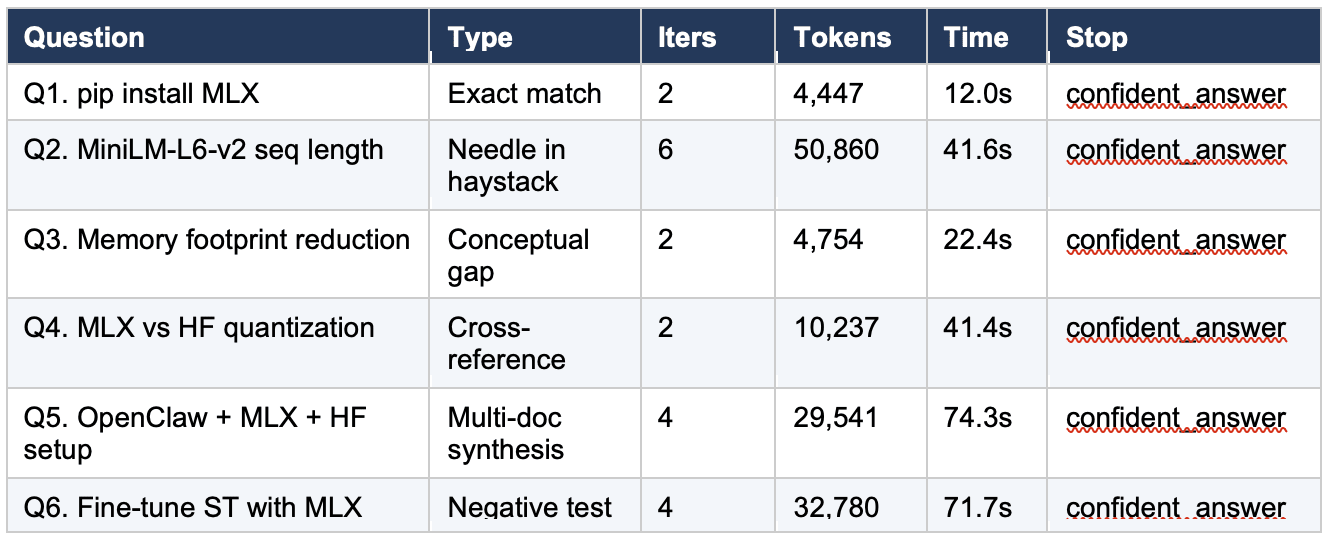
The following table shows the results from the M5 Pro run used throughout this guide. Your numbers will not match exactly (different corpus snapshot, model non-determinism), but the overall pattern should be similar.
Step 10.4, Read the table
Several things stand out in the results.
The healthy runs (Q1, Q3, Q4) cluster tightly: 2 iterations each, token counts between 4,447 and 10,237. Q4 is the outlier within this cluster. It used only one search to answer a cross-reference question that should have required two (one for MLX quantization, one for HuggingFace quantization). The model produced a detailed, well-formatted comparison, but the MLX-specific content is thin because it only had the MLX index page to work from. This is a calibration problem worth watching: the model produced a confident answer built on incomplete evidence. A reader whose Q4 run uses two or three iterations is likely getting a better answer than one whose run uses one.
Q5 (the worked trace from Section 6) is the healthy multi-iteration benchmark: 4 iterations, 29,541 tokens, converging queries across three doc sets.
Q2 is the borderline case analyzed in Section 8: 6 iterations (the cap), 50,860 tokens, oscillating queries. It is the most expensive run by a wide margin and the only one that used all six iterations.
Q6 (the negative test) is the surprise. It concluded correctly in 4 iterations that the corpus does not contain a specific answer for fine-tuning Sentence-Transformers with MLX, then offered reasonable general guidance. In the prior study on mlx-lm 0.31.2, this same question ran for 20 iterations without concluding. The improvement is discussed in Section 8.
11. What Part Two will add
Part One is about getting local agentic search to work at all and to work reliably on a fixed corpus. Part Two changes the corpus.
The Karpathy wiki pattern is a pre-compilation step. Instead of pointing the agent at raw documentation, you first ask a model to read the raw documentation and produce a structured wiki, with per-document summaries, cross-document indexes, and backlinks between related concepts. The agent then searches the wiki rather than the raw docs. The hypothesis, drawn from observations originally articulated by Andrej Karpathy, is that the work of compilation pays for itself many times over at query time, because the wiki is shaped for retrieval in a way that raw docs are not.
Part Two will run the same six questions against a Gemma-4-compiled wiki of the same four-doc corpus, using the same agent loop and the same tool contract from Part One. The only thing that changes is what the search tool is searching. That isolates the wiki effect from every other variable, which is the whole point.
Part Two will also cover the feedback loop, which is where the pattern becomes interesting. Once the agent is answering questions against the wiki, the query and answer pairs themselves can be filed back into the wiki as new entries, which compounds the wiki’s coverage over time. The question Part Two is built to answer is whether that compounding is real and measurable, or whether it is a story that sounds good but does not survive contact with the same six questions.
If you want to follow along, the prerequisites for Part Two are exactly the prerequisites for Part One, plus a directory to write the wiki into. No new models, no new dependencies, no new infrastructure.
Part Two follows. If you have not read the prior article, “RAG vs Agentic Search on Apple Silicon,” it is the natural prequel to this one and will make the cross-reference sections of both parts substantially more useful.